
What is the Insert Key and Its Purpose?
The Insert key, often abbreviated as ‘Ins’, is a crucial component found on most computer keyboards, typically located near or adjacent to the Backspace key. This key plays a pivotal role in switching between two distinct modes of text entry: Insert mode and Overwrite mode. By default, when typing, new text is inserted before existing text. However, once the Insert key is pressed, the mode switches to Overwrite, meaning new text will replace any existing text at the cursor’s position.

In addition to text editing, the Insert key is also employed for copy-paste functions in certain applications on Windows and Linux systems. To copy selected text, you can use the Ctrl + Insert shortcut, while Shift + Insert allows you to paste the copied content.
Locating the Insert Key on Your Keyboard
The Insert key is usually found near the Backspace key on standard keyboards. For laptops and MacBooks, activating the Insert key often requires the use of the Fn key combined with a manufacturer-specified key. Furthermore, on keyboards featuring a numeric keypad, the zero key on the Numpad can act as an alternative to the Insert key, provided the Num Lock function is disabled.
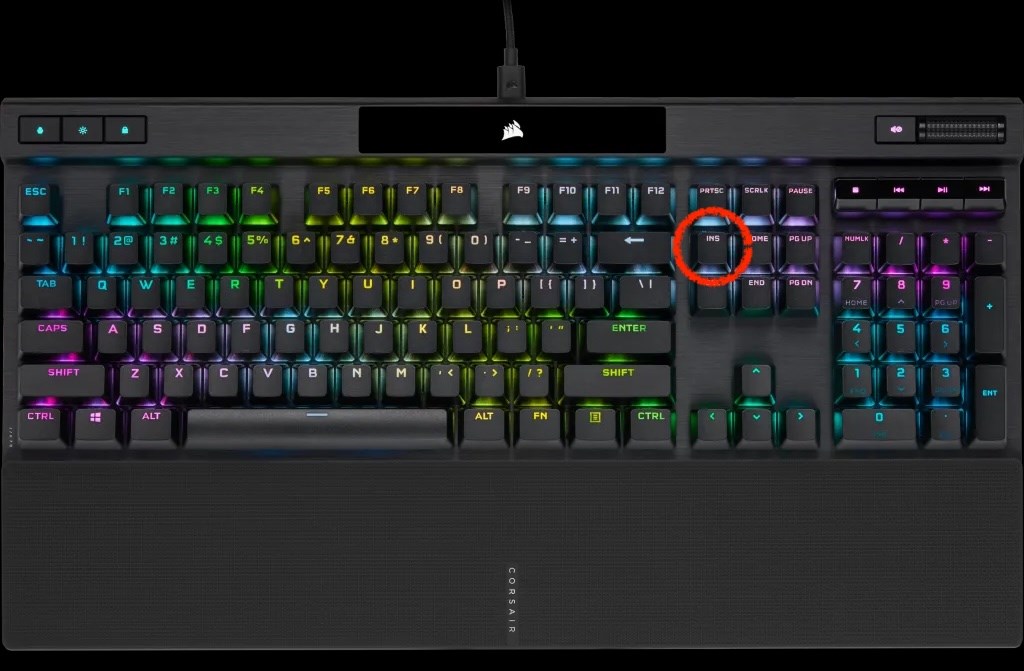
How to Utilize the Insert Key Effectively
Pressing the Insert key toggles your typing mode between Insert and Overwrite. In Insert mode, characters typed appear after the cursor, thereby pushing the existing text forward to accommodate new entries. Conversely, in Overwrite mode, any characters typed will overwrite existing content directly, offering a quicker method for text replacement.
Enabling the Insert Key in Word
If you find the Insert key inactive in Word, you can enable it by following these steps: Navigate to the File menu, select Options, then click Advanced on the left-hand list. Ensure the option ‘Use INS key to control overwrite mode’ is checked. Confirm with OK to activate the Insert key functionality.
Disabling the Insert Key
For those who wish to deactivate the Insert key, especially laptop users, the SharpKeys program or Registry Editor can be used effectively. To disable via Registry Editor, follow these steps:
- Open the Registry Editor.
- Navigate to HKEY_LOCAL_MACHINESYSTEMCurrentControlSetControlKeyboard Layout.
- Right-click in the right pane, select New – Binary Value, and name it Insert_Disable.
- Double-click the Insert_Disable entry.
- Input the following value data: 00 00 00 00 00 00 00 00 00 00 00 02 00 00 00 00 00 00 00 00 52 E0 00 00 00 00 00 00.
- Click OK and exit the Registry Editor.
- Restart your computer.
The Insert key is particularly beneficial for those needing flexibility in document creation and modification. It allows seamless integration of new content without altering existing text, while also enabling swift changes when needed through the overwrite function.