
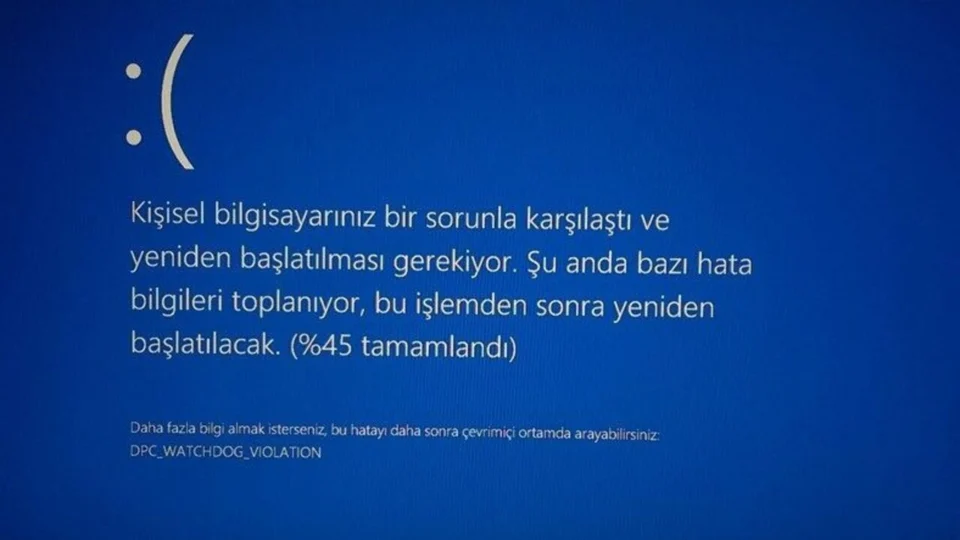
Understanding the Error The error message, ‘Your computer could not start properly’, is a common issue faced by many Windows users. This blue screen error indicates that the computer is unable to boot normally due to a variety of potential problems. Identifying the root cause is the first step towards a solution. Possible Causes of the Error This error can stem from several sources, including: Corrupted System Files: Essential files may be damaged or missing. Registry File Issues: Deleted or corrupted registry files from the System32 folder. Overheating: Excessive heat can affect hardware performance. Excessive RAM Usage: RAM working beyond its capacity. Malware or Viruses: Infection can disrupt normal operations. Update Errors: Problems during system updates. Driver Incompatibility: Conflicts between hardware drivers and the system. Solutions for the Error The following steps can help resolve the issue, depending on whether your computer can boot in safe mode: If Your Computer Boots in Safe Mode: Update Drivers: Ensure all drivers are up to date. Uninstall Recent Programs: Remove any recently installed software that might be causing issues. Adjust Memory Dump Settings: Modify settings to prevent memory issues. Run System File Checker: Use command prompt to check and repair system files. Windows Update: Keep your operating system updated to the latest version. If Your Computer Cannot Boot in Safe Mode: Startup Repair: Use Windows recovery tools to repair startup issues. System Restore: Roll back to a previous state when your system was functioning correctly. Reinstall Windows: As a last resort, reinstall the operating system to start fresh. Step-by-Step Instructions Updating Drivers Outdated drivers can cause startup errors. To update them: Boot in safe mode. Open Device Manager. Right-click the driver to update and select Update Driver. Follow the prompts and restart your computer. Uninstalling Recent Programs To remove potentially problematic software: Boot in safe mode. Go to Add or Remove Programs. Uninstall recent software installations. Restart your computer. Changing Memory Dump Settings To adjust memory settings: Boot in safe mode. Right-click Computer and select Properties. Navigate to Advanced System Settings and then Startup and Recovery. Disable Automatic Restart and choose Full Memory Dump. Restart your computer. Running System File Checker Use this tool to detect and fix errors: Boot in safe mode. Open Command Prompt as an administrator. Type sfc /scannow and press Enter. Restart your computer. Updating Windows Ensure your system is up to date: Boot in safe mode. Navigate to Settings and then Update and Security. Click on Windows Update and select Check for Updates. Install any available updates and restart. Using Startup Repair For computers that won’t boot: Connect a Windows recovery drive. Select Repair your computer and go to Troubleshooting. Choose Advanced Options and then Startup Repair. Follow the prompts to complete the repair. Performing a System Restore To revert to a previous system state: Use a Windows recovery drive to boot your computer. Select Troubleshooting and then Advanced Options. Choose System Restore and pick a restore point. Complete the process and restart. Reinstalling Windows If all else fails, reinstalling Windows may be necessary: Download the installation file from the Microsoft website, follow the instructions provided for formatting and installing a fresh copy of Windows. Please note, this will erase all data on your computer. If these steps do not resolve the issue, consider seeking professional support from a computer service technician.
Resolving the ‘Your Computer Could Not Start Properly’ Error
Learn how to fix the 'Your Computer Could Not Start Properly' error with our easy-to-follow guide. Get your computer running smoothly again.
 YazanSigorta Haber
Yayınlandı Güncellendi 3 dk okuma

YAZAR
Sigorta Haber
Finans ve ekonomi alanında uzman. Piyasa analizleri, yatırım stratejileri ve makroekonomik gelişmeler üzerine içerikler üretir.
Yazar profili ve tüm yazıları